
The scan cycle
A PLC repeats three steps for as long as it runs: it reads every input, runs your rungs from the top down, then writes every output. One round is one scan.
One scan, before and after
The sample project turns MotorRun on when StartPB is pressed. Green shows where the rung passes power.
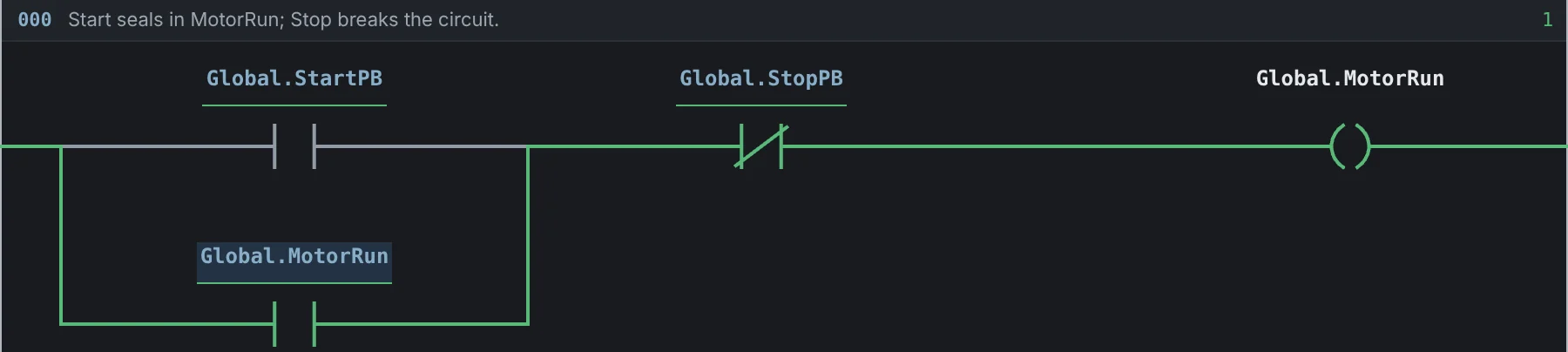
Motor Starter Practice: a parallel branch holds MotorRun after StartPB is released.
Try it
- Open the free sandbox. It starts with Motor Starter Practice.
- Click Click to toggle bits, then click the
StartPBcontact. Nothing turns green yet. - Click Single Scan.
MotorRunturns on at the end of the scan. - Turn
StartPBoff and scan again.MotorRunstays on, because its own contact now holds the rung. This is a seal-in.
Why it matters
The logic reads a copy of the inputs taken at the start of the scan, so an input cannot change halfway through. Outputs change only at the end, all together. If two rungs write the same output, the lower rung wins.
Good to know
- An input that changes during a scan is seen on the next scan.
- Time in Labs is simulated. Each scan moves the clock by exactly the scan time.
System_Scan_Countcounts scans.System_Scan_Firstis on during the first scan only.
Learn it in a lesson
- The PLC scan cycleBeginner · 20 min