
Call routine CALL
Runs another routine of this program, then comes back.
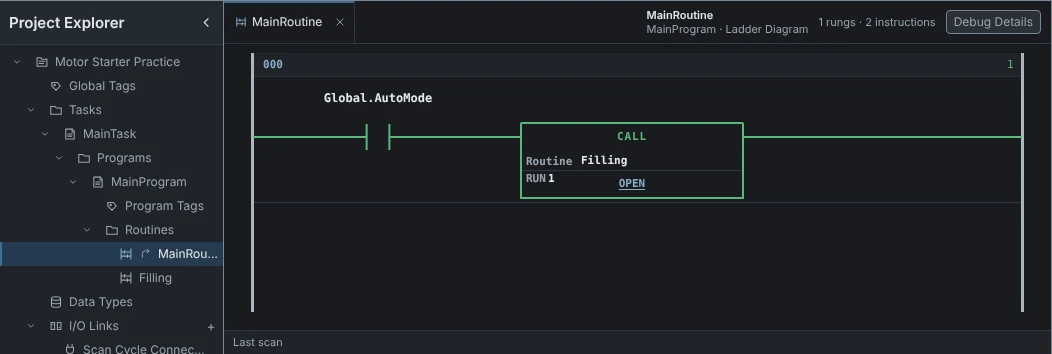
Routines MainRoutine, marked with the arrow, runs every scan by itself. Filling runs only when a CALL runs it.
Routine The routine this CALL runs: Filling.
OPEN Opens Filling.
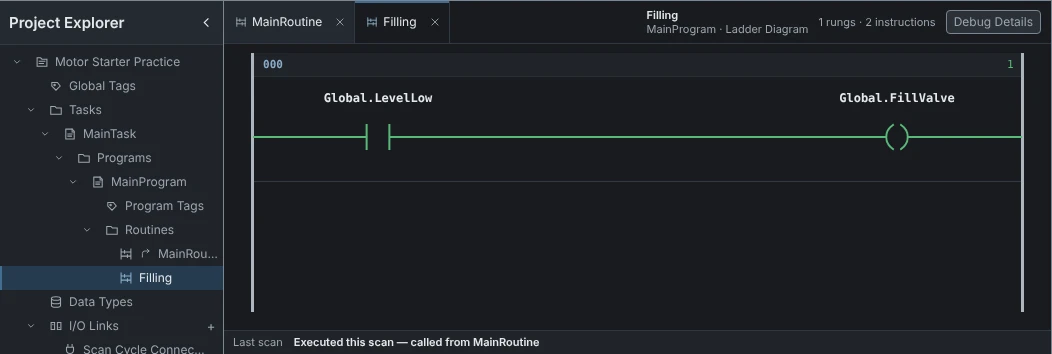
Filling Open in its own tab.
Last scan Executed this scan, called from MainRoutine. With AutoMode off it shows Not called in the last scan.
How it works
Runs the selected routine of the same Program at this point of the scan, then continues with the next step.
How it's used
Use CALL to run a routine only when it is needed, such as the filling logic in auto mode.
Global.AutoModeXIC
CALL_ROUTINE
RoutineFillingRUN 1
Global.LevelLowXIC
Global.FillValveOTE
| Tag | Value |
|---|---|
| AutoMode | 1 |
| LevelLow | 1 |
| FillValve | 1 |
AutoMode is on, so Filling runs and opens FillValve. With AutoMode off, Filling does not run at all.
Operands
| Operand | Data type | Read or write |
|---|---|---|
| Routine | Reads |
Common mistakes
- Expecting a routine to run on its ownOnly the main routine runs by itself. Other routines run only where a CALL runs them.