
The workspace
Everything is on one screen. You write logic in the middle, run it from the top and watch values at the bottom.
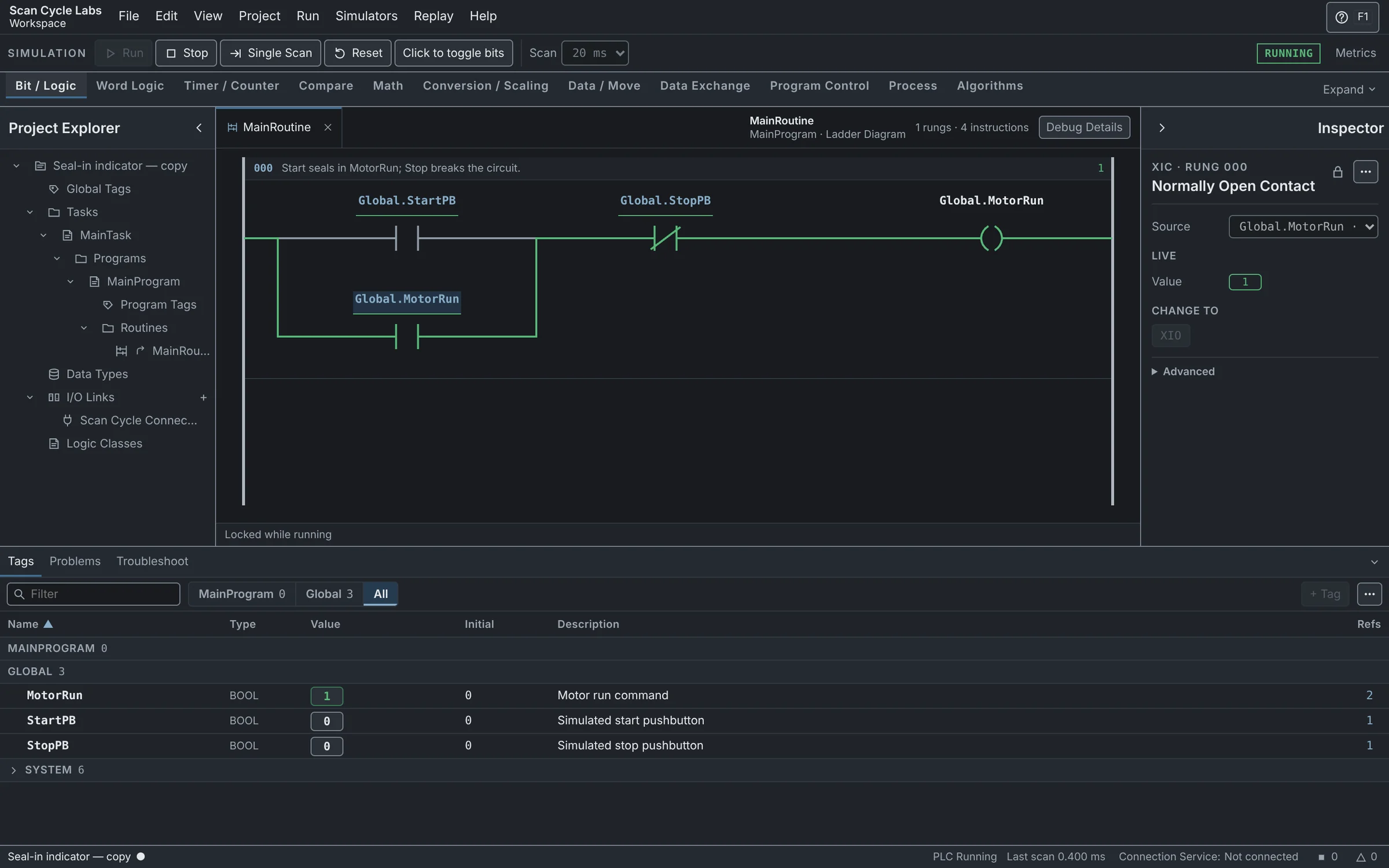
A motor seal-in project running with the Tags table and Inspector open.
Menus File, Edit, View, Project, Run, Simulators, Replay and Help.
Run controls Run, Stop, Single Scan, Reset and the scan time.
Instruction palette One tab per family. Drag an instruction onto a rung.
Project Explorer Programs, routines, tags, data types, Links and Logic Classes.
Editor The routine you opened. Rungs run from the top down.
Inspector Details of what you selected. Change operands here.
Bottom panel Tags, Problems, Troubleshoot and References.
Status bar PLC state, last scan time and the Connection Service.
Help The short Instruction Reference. F1 opens it.
Open a routine
- In Project Explorer, open MainProgram, then Routines.
- Click MainRoutine. It opens as a tab in the editor.
- Click a contact. The Inspector shows its tag and value.
Good to know
- A panel you closed comes back from the View menu.
- Logic is locked while the PLC runs. The editor says Locked while running. Stop it to edit.